Managing Your Account
Last updated: December 24, 2025
👤 Managing Your Account
Access the Profile Menu to update settings, customize preferences, and contact support for assistance.
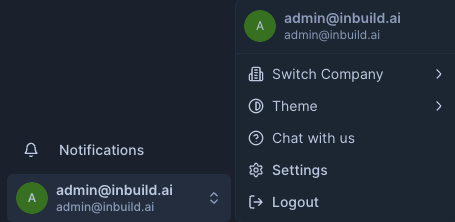
📍 Where to Find Your Account Menu
To open your account menu:
Go to the bottom-left corner of your screen.
Click your name or profile icon.
A menu will appear with several options to manage your account.
⚙️ Account Menu Options
Option | Description |
Switch Company | Switch between companies linked to your profile. |
Theme | Toggle between light and dark display modes. |
Chat with Us | Start a live chat with our support team for real-time help. |
Settings | Manage personal preferences, profile details, and notification settings. |
Logout | Securely log out of your account. |
🔔 Viewing Notifications
Click the bell icon near your name to open the Notifications panel. Here, you’ll see updates, invoice alerts, and items needing your attention.
Last updated: May 13, 2025