Outbox Overview
Last updated: December 24, 2025
📤 Outbox Overview
The Outbox lets you review sent invoices, track their processing status, and identify any pending actions, ensuring clear visibility over outgoing documents.
📦 Outbox Entry Details
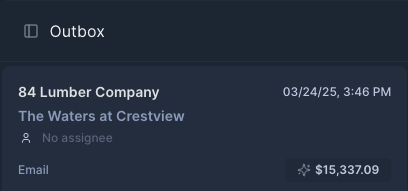
Each entry in the Outbox includes key invoice and status information at a glance:
Field | Description |
Vendor Name | The company the invoice is from (e.g., 84 Lumber Company). |
Project | The linked project (e.g., The Waters at Crestview). |
Date & Time | Timestamp of when the invoice was processed or added (e.g., 03/24/25, 3:46 PM). |
Assignee | Shows who is responsible for follow-up (if unassigned, it reads "No assignee"). |
Source | Indicates where the invoice came from (e.g., Email). |
Invoice Total | The amount on the invoice (e.g., $15,337.09). |
🔄 Common Actions
Assign an owner: Click to designate a team member to follow up or approve.
Open details: Click the card to view the full invoice PDF, line items, and comments.
Sort/filter: Use the top of the Outbox panel to filter by vendor, project, or assignee.
🛠 Tip
Use the Outbox as a staging area to quickly:
Spot missing assignees
Review invoice origins (e.g., email, upload)
Prioritize by invoice amount or vendor
Last updated: May 7, 2025